















Short answer: A false alarm usually has an identifiable cause: a motion detector that picks up a pet, sunlight or warm air, a window that isn't properly closed, a magnet too far from its sensor, an almost flat battery, or someone arming or disarming the system incorrectly. Find the cause for each alert and deal with it specifically.
Our solution
An alarm system you set up yourself
Door/window contacts on windows and doors, motion detectors only where they belong. Control it with the app, the control panel or a remote.
View the options
Why you want to prevent false alarms
One false alarm is annoying. Repeated false alarms are dangerous, because everyone gets used to them. Neighbours no longer look up when the siren sounds, and you swipe away an alert on your phone more quickly. That is exactly when you miss the alert that is real.
How big that effect can get is shown by a figure from the Dutch police about hold-up alarms: around 99 percent of the electronic hold-up alarms passed on via private alarm receiving centres in the Netherlands turn out to be false afterwards. That is why alarm receiving centres verify such alerts first. That figure concerns panic buttons, not home alarms, but the principle is the same: the fewer false alerts, the more seriously a real alert is taken.
The seven most common causes and what to do about them
If you get an unjustified alert, first check in the app which sensor triggered it. Give your sensors recognisable names, such as Back door or Living room, so you can see it straight away. After that, you will usually find the cause in this list.
| Cause | What happens | Solution |
|---|---|---|
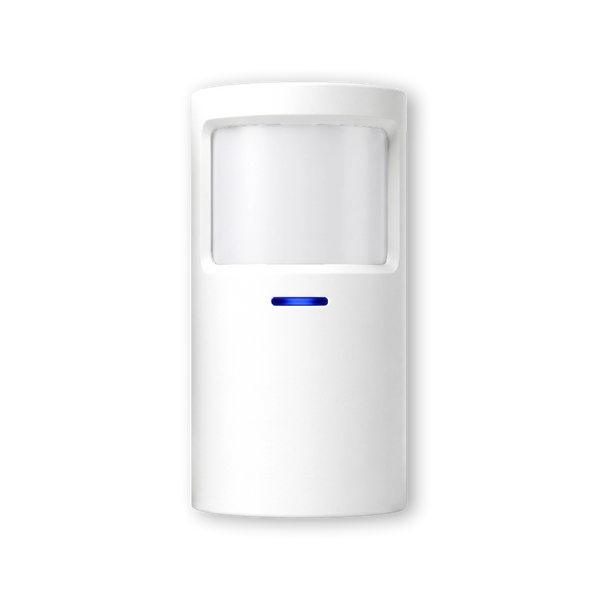
| Pets | A motion detector reacts to heat and movement, so also to a dog or cat. | Don't install a motion detector in rooms where your pet roams freely while the alarm is armed. Protect those rooms with door/window contacts on windows and doors. |
| Sun, heating and draughts | Sunlight falling on the floor, a radiator or heater switching on, or warm air from a ventilation grille causes a temperature change that the detector can mistake for movement. | Don't point the detector at windows, radiators, heaters or ventilation grilles. Ideally, mount it with its back to the window. |
| Window or door not properly closed | A window left ajar or a door that doesn't latch triggers an alert straight away when you arm, or blows open in the wind. | Check windows and doors before you arm, and don't leave a window on the tilt setting while the alarm is armed. |
| Magnet too far from the sensor | If the magnet is too far from the sensor or not directly opposite it, the system sees the door as open, even when it is closed. | Stick the sensor and magnet directly opposite each other and as close together as possible. Check that the adhesive is still firmly attached. |
| Almost flat battery | A sensor with a weak battery can become unreliable: fault alerts, or no alert at all. | Replace the battery in good time and test the sensor again afterwards. |
| Mistake when arming or disarming | The door opens before the alarm is off, or a button on the remote gets pressed by accident in a trouser pocket. | Disarm with the app or the remote before you open the door. Use a remote with covered buttons. |
| Guests, cleaner or babysitter | Someone who doesn't know the system walks in while the alarm is armed. | Disarm the alarm remotely via the app, or give that person their own way to disarm. |
Motion detectors are the most common source. Exactly where and at what height to mount them is explained in where to mount a motion detector. How a door/window contact works and how to align it properly is covered in how a door or window contact works.
Pets: the trickiest cause

A motion detector can't automatically tell the difference between a burglar and a dog. It reacts to heat that moves. A cat jumping onto the sofa or a dog walking through the room at night can therefore trigger an alert.
The most reliable solution is to organise your protection differently. Protect the rooms where your pet roams freely with door/window contacts on the windows and doors. After all, a burglar has to get through those first. Then use motion detectors in rooms your pet doesn't enter, such as a study, or the upstairs floor if the stairs are closed off. If there is a room where your pet stays at night or during the day, keep it free of motion detectors.
How to avoid mistakes when arming and disarming
- Make it a fixed routine. Windows closed, back door locked, and only then arm. A fixed round prevents most unnecessary alerts.
- Disarm before you open the door. With the app or a remote in your hand, you are quicker than the sensor on the front door.
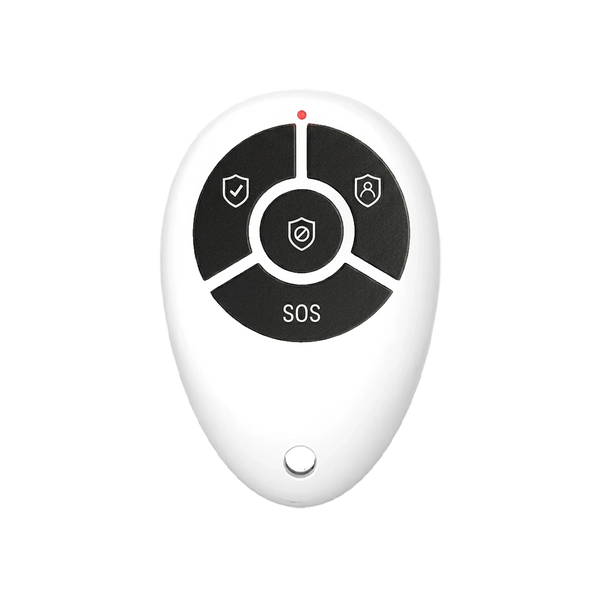
- Prevent accidental presses. The QuickLink Pro remote has a slider that covers the buttons, so they don't get pressed by accident in your pocket or bag.
- Use home mode when you are at home. The QuickLink Pro has a separate button for this. Check in the app which sensors are active in that mode.
- Make sure everyone knows the system. Housemates, but also the babysitter or cleaner. Give them their own remote or a PIN code on the SlimPad keypad, or disarm remotely via the app yourself when you know they are coming.
- Test after every change. If you have moved a sensor or a cupboard, walk past and check that the alert is correct.
You can also prevent many false alerts with simple maintenance: dust and cobwebs off the detectors, batteries replaced in good time. There is a checklist for this in is maintenance of an alarm system mandatory.
So how do you prevent false alarms with your alarm system?
For each alert, find out which sensor triggered it, keep motion detectors away from pets, windows and heat sources, align door/window contacts properly, replace batteries in good time and make arming and disarming a fixed routine that everyone in the house knows.


Our solution
An alarm system you set up yourself
Door/window contacts on windows and doors, motion detectors only where they belong. Control it with the app, the control panel or a remote.
View the options
Frequently asked questions
Can a cat or dog set off the alarm?
Yes. A motion detector reacts to heat and movement, including from animals. If your pet roams freely, don't install a motion detector in that room and protect the windows and doors there with door/window contacts.
Can sunlight or heating cause a false alarm?
Yes. Sunlight on the floor, a radiator or heater switching on and warm air from a ventilation grille change the temperature in the room. That is why you should not point a motion detector at windows or heat sources.
How far can the magnet of a door/window contact be from the sensor?
That depends on the model. According to the product information, the LockSense Pro works up to a distance of about 2 cm and also at different angles. Stick the sensor and magnet as straight and close to each other as possible.
How do you prevent arming or disarming the alarm by accident?
Use a remote with covered buttons. The QuickLink Pro has a slider that covers the buttons, so they don't get pressed by accident in your pocket or bag.
What do you do when a cleaner or babysitter comes round?
Disarm the alarm remotely via the app when you know someone is coming, or give that person their own remote or a PIN code on the SlimPad keypad. Briefly explain beforehand how the system works.
Sources and references
- Politie (Dutch police), Wat wordt bedoeld met verificatie? — accessed September 2026
- Neroo, Product data ShieldSense, LockSense Pro, QuickLink Pro and SlimPad (web shop) — accessed September 2026


