















Short answer: There is no single best brand. Choose a SIM card with texts and call minutes on the network that has good coverage where your alarm system is. A prepaid card is usually enough, because an alarm sends few messages. Do bear in mind that prepaid cards are deactivated if they are used too little, and check the manual to see whether the PIN code needs to be turned off.
Our solution
Alarm system with SIM card slot, without a subscription
ShieldLink® Pro and Elite, CamperGuard Pro and ShieldLink® Marine have a SIM card slot. When the alarm goes off you get a text and a call, even without Wi-Fi.
View the options
An alarm system with a SIM card reports a break-in via the mobile network, so even when there is no Wi-Fi or the internet connection drops out. Handy in a shed, holiday home, motorhome or boat. But which SIM card do you put in it? The answer depends less on the brand than on a few practical things: coverage, texts and call minutes, how long your credit stays valid and what happens when you go abroad.
Which alarm systems use a SIM card?
Not every alarm system needs a SIM card. Systems that work via Wi-Fi and an app send their notifications over the internet. A SIM card is especially useful when there is no Wi-Fi, or if you also want to be alerted when the Wi-Fi or power fails.
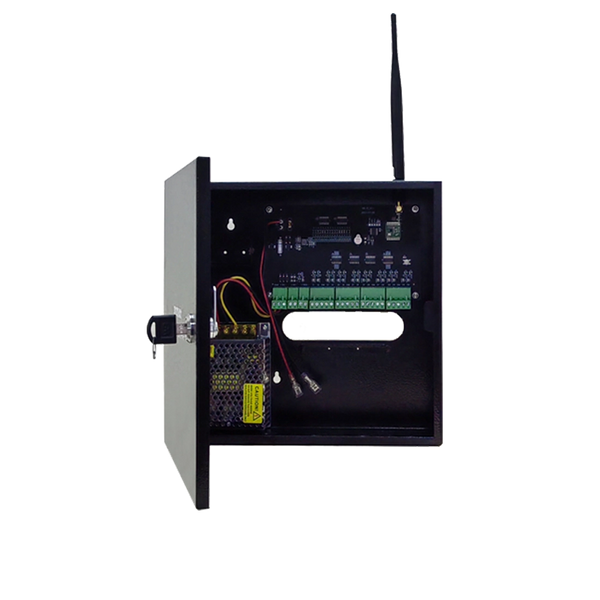
At Neroo, these panels have a SIM card slot: ShieldLink® Pro, ShieldLink® Elite, CamperGuard Pro and ShieldLink® Marine. With a SIM card you get a text and a phone call when the alarm goes off, and you can operate the system with SMS commands. The panels have a backup battery and keep running for up to 24 hours during a power cut. The ShieldLink® Plus and Lite have no SIM card slot; they alert you via the app. The SIM card is not included: you arrange it yourself, with the provider of your choice.
Prepaid or SIM-only?
For an alarm system, an ordinary SIM card from a Dutch provider is enough. The choice is mainly between prepaid (pay in advance, no contract) and SIM-only (fixed monthly fee).
| Prepaid | SIM-only | |
|---|---|---|
| Costs | Only what you use; you top up when needed | Fixed amount per month, even if the alarm never goes off |
| Contract | No contract, no notice period | Contract with a fixed term or notice period |
| Watch out | Credit and number can expire if used too little | Card stays active as long as you pay |
| Suits | An alarm that sends few messages | Anyone who doesn't want to think about topping up or who gets called often |
In a normal year an alarm system sends only a handful of messages, so prepaid is usually the cheapest. The biggest risk is that the card is deactivated after a long quiet period. For example, with the Dutch provider Odido, credit you have topped up yourself stays valid indefinitely as long as you actively use the SIM card at least once every six months (calling, texting, mobile internet or topping up). If you don't, the card is first blocked for 30 days and then deactivated. Other providers have their own rules, so check the terms and conditions of your provider.
Practical tip: set a recurring reminder in your calendar to top up, and test your alarm regularly. If the panel sends a text during a test, the card is actually being used too. Check with your provider what counts as active use.
Texts and call minutes, not just data
An alarm panel with a SIM card alerts you by text and phone call. A data-only SIM card without calling and texting is therefore not suitable. Also consider the number of phone numbers you set up: when there is a break-in, the CamperGuard Pro and ShieldLink® Marine keep calling the configured numbers until someone answers. With three contacts, one alarm can therefore cost several calls and texts. Make sure there is always enough credit for a few alarms in a row.
Choose the network with coverage on site
In the Netherlands there are three mobile networks: KPN, VodafoneZiggo and Odido. Many other providers use one of those three networks. For your alarm, what matters is not which network is best in general, but which network has coverage where the panel is: in the shed, the basement, the motorhome or the forepeak of your boat.
- Test with your phone. Stand where the panel will go and call or text with a phone on the same network. If that works well, the panel will have coverage there too.
- Watch out for metal and concrete. A steel shed, a basement or a boat with a metal hull can weaken the signal considerably. In that case, mount the panel higher up or closer to a window.
- Look at 4G. The Neroo panels with a SIM card slot work on 4G. Older networks are disappearing: in the Netherlands, Odido has announced it will stop 3G from August 2026 and KPN will stop 2G in December 2027. Read more in what the switch-off of 2G and 3G means for your alarm system.
PIN code and SIM size

An alarm panel can't always enter a SIM card's PIN code. So check in your alarm system's manual whether the PIN code needs to be turned off. If it does, do it beforehand: put the SIM card in a phone and disable the SIM PIN in the settings. Also check in the manual what size the SIM card slot takes.
A good order: activate the new SIM card in a phone first, make one call and send one text with it, top up if needed, and only then put it in the panel. Then set up the phone numbers and run a test alarm. That way you know for sure the card works before you need it.
Going abroad with the motorhome or boat
If you cross the border with the motorhome or boat, the SIM card in your alarm travels with you. Within the European Union and in Norway, Iceland and Liechtenstein, the European roaming rules apply: you call, text and use the internet there at the same rate as at home in the Netherlands. Outside those countries the rules don't apply, and an alarm call or text can be considerably more expensive. On a long stay abroad, a provider may also charge a surcharge if you use more data there than at home.
- Before you leave, check that roaming is enabled on the SIM card in your alarm.
- Check what calls and texts cost in the countries outside the EU you will visit.
- Test the alarm at your first destination: coverage and roaming don't work the same everywhere.
You can read more tips for the road in our tips for a safe motorhome holiday.
Checklist: how to choose the SIM card
- An ordinary SIM card with texts and call minutes, not a data-only card.
- The network with good coverage where the panel is, tested with a phone.
- Prepaid if the alarm sends little, but with a fixed reminder to top up and keep the card active.
- SIM-only if you don't want to think about credit or validity.
- PIN code and SIM size checked in the manual.
- For a motorhome or boat: roaming and rates outside the EU checked.
So: which SIM card is best for an alarm system?
The best SIM card for your alarm is an ordinary prepaid or SIM-only card with texts and call minutes, on the network that has good coverage where the panel is, and one you keep active so it isn't deactivated.


Our solution
Alarm system with SIM card slot, without a subscription
ShieldLink® Pro and Elite, CamperGuard Pro and ShieldLink® Marine have a SIM card slot. When the alarm goes off you get a text and a call, even without Wi-Fi.
View the options
Frequently asked questions
What subscription do you need for an alarm system with a SIM card?
No special subscription. An ordinary prepaid card or SIM-only with texts and call minutes is enough, as long as the network has good coverage where the panel is.
How long does a prepaid SIM card stay active?
That varies by provider. With the Dutch provider Odido, credit you have topped up yourself stays valid as long as you actively use the card at least once every six months; after that, the card is blocked and then deactivated (accessed September 2026). Check the terms and conditions of your provider.
Does the SIM card's PIN code need to be turned off?
Check this in your alarm system's manual. If the PIN code needs to be turned off, do it beforehand in a phone via the SIM card settings.
Does a Dutch SIM card in my alarm work abroad?
Within the EU and in Norway, Iceland and Liechtenstein, you call and text at your Dutch rate under the European roaming rules. Outside those countries the rules don't apply; check your provider's rates beforehand.
Does every Neroo alarm system have a SIM card slot?
No. ShieldLink Pro, ShieldLink Elite, CamperGuard Pro and ShieldLink Marine have a SIM card slot. ShieldLink Plus and Lite don't and alert you via the app.
Sources and references
- Odido, Hoe lang is mijn prepaid tegoed geldig? (veelgestelde vragen) — accessed September 2026
- ACM (Dutch Authority for Consumers and Markets), Vanaf 15 juni bellen, sms'en en internetten binnen Europa voor het thuistarief — accessed September 2026
- ACM (Dutch Authority for Consumers and Markets), Gevolgen van de afschakeling van 2G en 3G — accessed September 2026
- Rijksoverheid / Tweede Kamer (Dutch government / House of Representatives), Brief over de gevolgen van de afschakeling van mobiele netwerken, 18 mei 2026 (Kamerstuk 24095, nr. 593) — accessed September 2026
- Neroo, Product information ShieldLink® Pro, Elite, Plus, Lite, CamperGuard Pro and ShieldLink® Marine (current web shop) — accessed September 2026


